EQ Gateway
The EQ Gateway is a computer running EQ Coherence and EQ Sight — continuous power quality data collection with built-in visualization and analysis. It connects to EQ Wave sensors via a dedicated Ethernet subnet, records CPOW and power monitoring (PMon) data to local storage, and serves the data through REST and WebSocket APIs.
Hardware Requirements
- Minimum 4 GB RAM
- Minimum 4 GB free space on root filesystem
- Two Ethernet ports (one for sensor subnet, one for facility LAN)
- Debian-based Linux OS (Debian, Ubuntu, etc.)
- Removable storage media for CPOW data rated for sustained high-volume writes. Do not write CPOW data to the root filesystem; use dedicated removable media. See Data Storage for rates, retention, and Storage Media for hardware guidance.
The gateway also requires an EQ Wave sensor with media converter to collect data. These are included with the EQ Wave package; see EQ Wave Installation for details.
Network Architecture
The gateway has two Ethernet ports: one connects to your facility LAN, and the other connects to the EQ Wave sensor subnet via a media converter. The media converter bridges between Cat 5e Ethernet (100Base-TX) and plastic optical fiber (100Base-FX), providing complete electrical isolation between the sensor and gateway.
Sensor Network
- EQ Wave sensor: 192.168.10.10 (fixed IP)
- Gateway sensor interface: 192.168.10.2 (fixed IP)
- Subnet mask: 255.255.255.0
- Isolation: No routing to facility network (fiber optic isolation maintained)
Facility Network
- Gateway LAN interface: DHCP or static IP (configurable via LAN Configuration)
- EQ Coherence web interface: HTTP on port 80 (proxied to backend on port 8080)
- EQ Coherence REST API: Port 8080 (see API Reference)
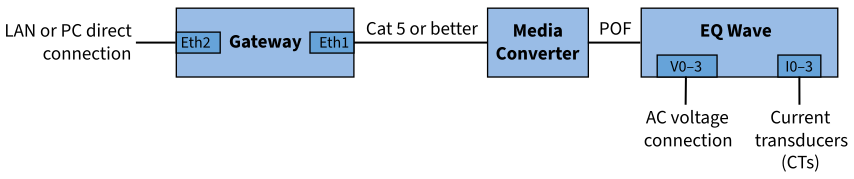
System connection diagram
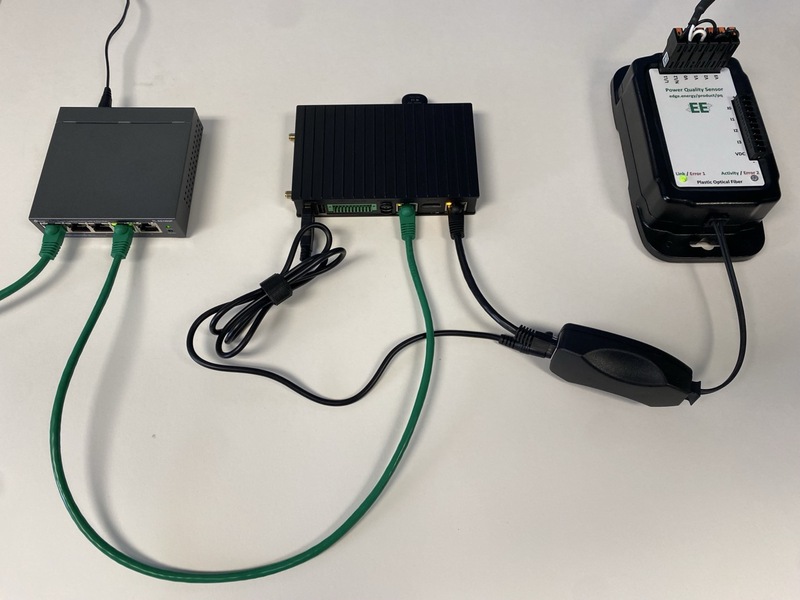
Example system setup
Power Supply
Each device in the system (gateway, media converter, EQ Wave sensor) requires exactly one power source. Do not connect multiple power sources to the same device.
EQ Wave sensor: Self-powered from the monitored AC mains (85–528V) or DC input (4.5–36V on v1.2).
Media converter (use one):
- USB power from the gateway
- Dedicated DC adapter
Gateway power options vary by hardware. See your platform-specific page for details.
Software
All gateways run the same EQ Coherence software stack regardless of hardware platform. Capabilities include:
- REST API: HTTP-based data access (JSON and Arrow IPC formats)
- WebSocket: Live waveform and spectral streaming
- Additional protocols: Modbus TCP, MQTT, DNP3 available upon request
- Remote Support: VPN tunnel for authorized technical support (enabled by default, can be disabled)
- Network Isolation: Sensor network is physically isolated from facility LAN via fiber optic connection
Supported Platforms
| Lab Gateway | Industrial Gateway (Compulab) | Industrial Gateway (Toradex Ivy) | |
|---|---|---|---|
| Temperature range | 0°C to 50°C | -40°C to +80°C | -40°C to +85°C |
| Ethernet ports | 1 built-in + USB adapter | Dual built-in Gigabit | Dual built-in Gigabit |
| Industrial certifications | No | CE, UL | CE, FCC (pending) |
| Boot media | NVMe SSD | eMMC (internal) | eMMC (internal) |
| Data storage | NVMe SSD | microSD via USB adapter | microSD (direct slot) |
- Compulab IOT-GATE / IOT-DIN — Current production industrial gateway
- Toradex Verdin iMX95 + Ivy — Next-generation production gateway (available Q2 2026)
- Raspberry Pi 5 (Lab Gateway) — Lab, workbench, demonstrations, and smaller deployments
Platform Not Listed?
EQ Coherence runs on most Debian-based platforms (e.g. Debian or Ubuntu) that meet the hardware requirements above. If your hardware is not in the table, we can confirm whether Coherence can be installed and which Ethernet ports it should bind. Run the following and send us the output:
# CPU architecture (determines which package build applies)
uname -m

# Platform model — one of these will return a value for your hardware
cat /sys/firmware/devicetree/base/model 2>/dev/null   # ARM boards (Raspberry Pi, Toradex, NVIDIA Jetson/DGX, etc.)
cat /sys/class/dmi/id/sys_vendor /sys/class/dmi/id/product_name 2>/dev/null  # x86 boards (Advantech, industrial PCs, etc.)

# Network interfaces (so we can identify the sensor and LAN ports)
ip -br link
The model string identifies the platform; the interface list and CPU architecture let us determine package compatibility and map the correct sensor and facility-LAN ports. Send all of the output, including any blank lines — an empty result for one command is itself informative (for example, the device-tree command returns nothing on x86 hardware).